Assets & Depreciation — Controller Guide
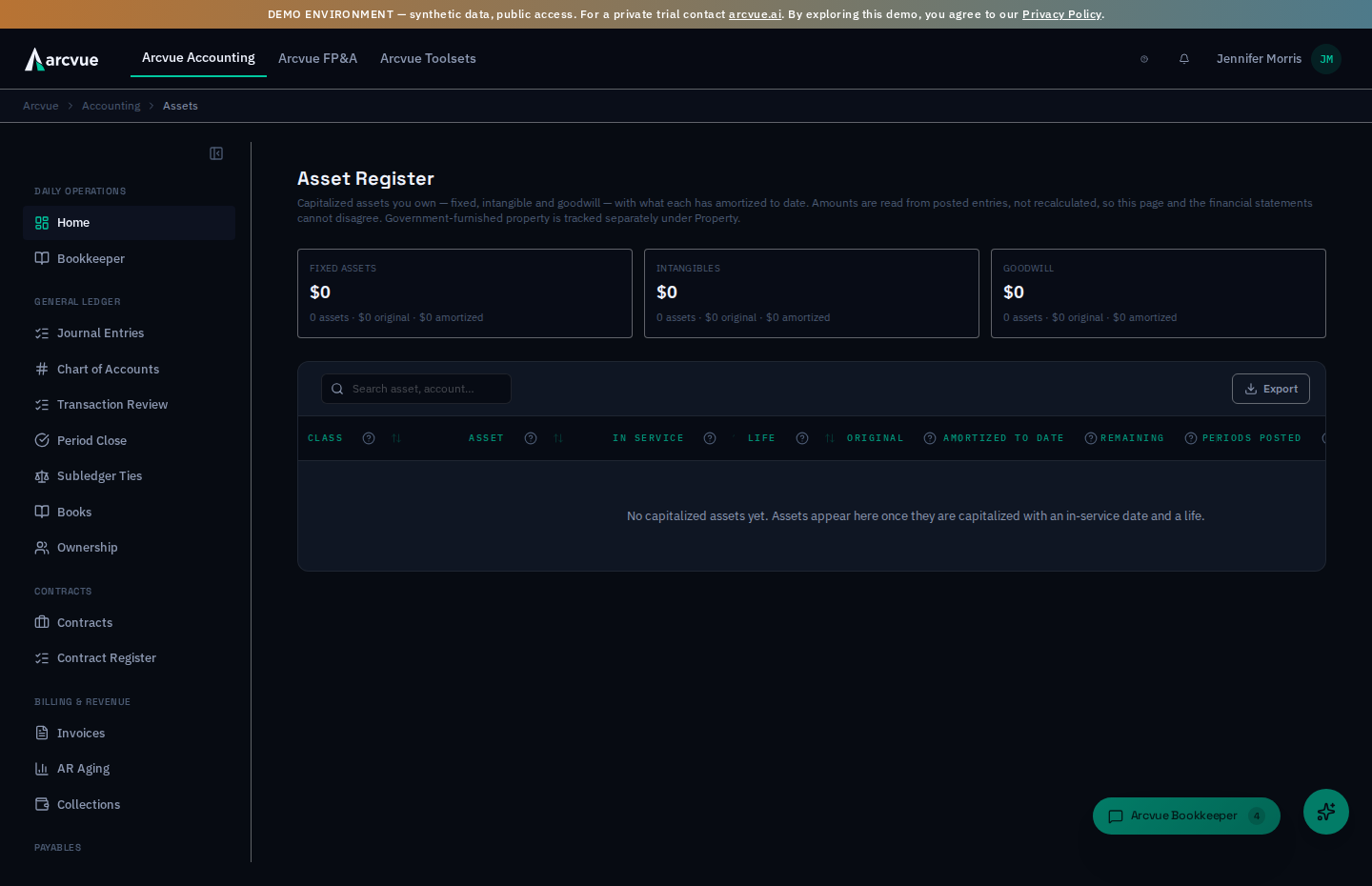
The asset register is every capitalized thing your company owns — equipment and improvements, intangibles like tradenames and loan fees, and goodwill from an acquisition — with what each one has amortized so far and what is left. The mental model: this page is a mirror of the ledger, not a worksheet. Every amount shown is summed from entries that actually posted, so if this page and the financial statements ever disagreed, one of them would be lying — and they cannot. This guide explains the three classes and their FAR treatment, then walks how to read the register and what to do when an asset has never amortized.
For: controllers · Time: ~8 minutes · You'll need: the Accounting module. There is nothing to enter — the register is read from the ledger.
In the left nav, open Accounting → Assets → Assets & Depreciation (/accounting/assets). The page header reads Asset Register. This is not the Government Property page — see below.
Part 1 — The ideas you need first (read once)
This is not the Government Property page
The two are different registers, and it is worth being sure which one you want.
| Assets & Depreciation | Government Property | |
|---|---|---|
| What it holds | Things you own and capitalized | GFP / CAP / CFE — things the government furnished or you bought on its behalf |
| Governed by | Your capitalization policy | FAR Part 45 |
| Why you open it | Depreciation, amortization, remaining book value | Physical inventory, custody, the annual self-assessment |
One kind of item legitimately appears in both, and it is not a duplicate. Government property you bought on the government's behalf is still property you depreciate. Where that is the case, Arcvue mirrors the property record into this register as one linked row, and it depreciates through exactly the same monthly run as everything else you own. It is enrolled automatically once the record has what depreciation needs — an in-service date, a cost, a life, and both the asset and accumulated-depreciation accounts.
The property record never posts on its own. The Government Property page owns the record; this register owns the depreciation. That split is the point: before it existed, a contractor-depreciated item ran down a different rail from every other fixed asset the company owns, and kept a second accumulated- depreciation figure that drifted from the ledger the moment a period was skipped. Now there is one register and one producer, so the number you see here is the number in the books.
If you are answering "what is our accumulated depreciation" or "do you amortize intangibles", you want this page. If you are answering "what does the government hold us accountable for", you want Government Property.
The three classes
The strip at the top shows each class with its remaining book value, and underneath, the asset count, original cost and amount amortized to date. They are separated because they are accounted for differently and an auditor will ask about them separately.
| Class | What belongs in it | Allowability |
|---|---|---|
| Fixed assets | Tangible property — equipment, leasehold improvements, vehicles | Depreciation is generally allowable |
| Intangibles | Tradenames, customer lists, loan fees | Unallowable under FAR 31.205-49, so amortization posts to an unallowable expense account and never reaches an indirect pool |
| Goodwill | The premium paid over identifiable net assets in an acquisition | Unallowable under FAR 31.205-49, same treatment |
A class with no assets still shows, reading zero. That is deliberate: an empty class tells you the register tracks it and you hold none, which is a different statement from the class being absent.
Amounts come from posted entries, never a recomputation
A scheduled run posts each month's slice of depreciation and amortization for every asset in the register. What an asset has "amortized to date" is the sum of its own posted legs — not original ÷ life × months elapsed. Recomputing it would create a second valuation that drifts from the ledger the moment a period is skipped, an asset is disposed mid-life, or a run is missed, and the register would then disagree with the statements while looking authoritative. Reading the ledger is what makes this page trustworthy.
What Arcvue deliberately will not do
- It won't let you edit a figure here. There is nothing to type; a wrong number traces to the asset's recorded cost, in-service date or life, or to a run that has not happened.
- It won't recompute accumulated depreciation from a formula.
- It won't send intangible or goodwill amortization into an allowable pool.
- It won't hide a class you hold nothing in.
Part 2 — How to run it
Step 1 — Read the strip
Three tiles across the top: Fixed assets, Intangibles, Goodwill — each with remaining book value, count, original cost and amortized to date. This is your balance-sheet-level answer.
Step 2 — Read the register
One row per asset, with Class, Asset, Status, In service, Life (months), Original cost, Amortized to date, Remaining, Periods posted (how many monthly slices have posted), and Expense account (where its slice lands). Sort by any column.
Status is where the asset is in its life: active while you hold it, disposed once it has been sold, scrapped or written off. A disposed asset stops depreciating, so when one has no slice behind it Periods posted reads n/a · disposed in gray; only an asset still in service reads never posted in amber, because only that one needs a look.
Step 3 — Look at what has never amortized
If any asset still in service has no posting behind it, a banner — N assets have never amortized — calls it out: These are in the register but no depreciation or amortization has posted for them. Usually the in-service date is in the future or the asset was added after the last run. Sort by Periods posted to find them; the next monthly depreciation run picks up anything whose in-service date has arrived. An asset that stays here after a run has passed its in-service date is worth a question.
Disposed assets are not counted. When some also have no posting, the banner says so in one closing sentence — they need nothing — and with only disposed assets in that state, no banner appears at all.
Step 4 — Where the register comes from
There is nothing to enter on this page. Assets reach the register when they are capitalized — recorded with an in-service date and a life in months — and the scheduled run posts each month's slice from then on. Today the register is populated for you at implementation from your existing fixed-asset schedule; there is no add-asset form on this screen.
Part 3 — At close, and when something looks wrong
On the close checklist, the row Depreciation, interest and amortization posted (under Compliance) asks whether this month's period-end entries actually posted — fixed-asset depreciation, intangible amortization, debt interest, prepaid amortization and lease amortization. It only asks about the classes you actually hold, it is a flag rather than a hard gate, and it counts entries, not amounts: a green row means the run happened, not that every asset was covered. Its Review button lands here, which is where you can see per asset what has and has not been taken.
"An asset shows never posted." Its in-service date is in the future, or it was added after the last run. Wait for the next run; if it is still there afterward, raise it. (A disposed asset reads n/a · disposed instead, and needs nothing.)
"The remaining book value looks wrong." Remaining is original cost less what has actually posted. Check Periods posted against the months since the in-service date — a gap there is a missed run, not a wrong formula.
"I need to add an asset." This page cannot; it mirrors the ledger. Assets are capitalized into the register outside this screen — raise it with your administrator.
"The page says No capitalized assets yet." The register is empty for your tenant. Assets appear once they are capitalized with an in-service date and a life.
"The page says it could not load the asset register." The request failed; that is not a statement that nothing has been capitalized. Reload, and if it keeps happening the server is not answering.
One-line summary
Accounting → Assets → Assets & Depreciation is the register of what you own — fixed assets, intangibles and goodwill — with original cost, what has amortized to date and what remains, every figure read from posted entries so it cannot disagree with the statements. Intangibles and goodwill amortize as unallowable under FAR 31.205-49; government-furnished property lives on a different page.
Related
- Government property (FAR Part 45), the other register → Government Property
- The close row that checks these postings happened → Close a Month (Period Close)
- Where an unallowable amortization is kept out of the pools → Unallowable Cost
- The other amortizing register → Prepaid (
/accounting/prepaid)