Close a Month (Period Close)
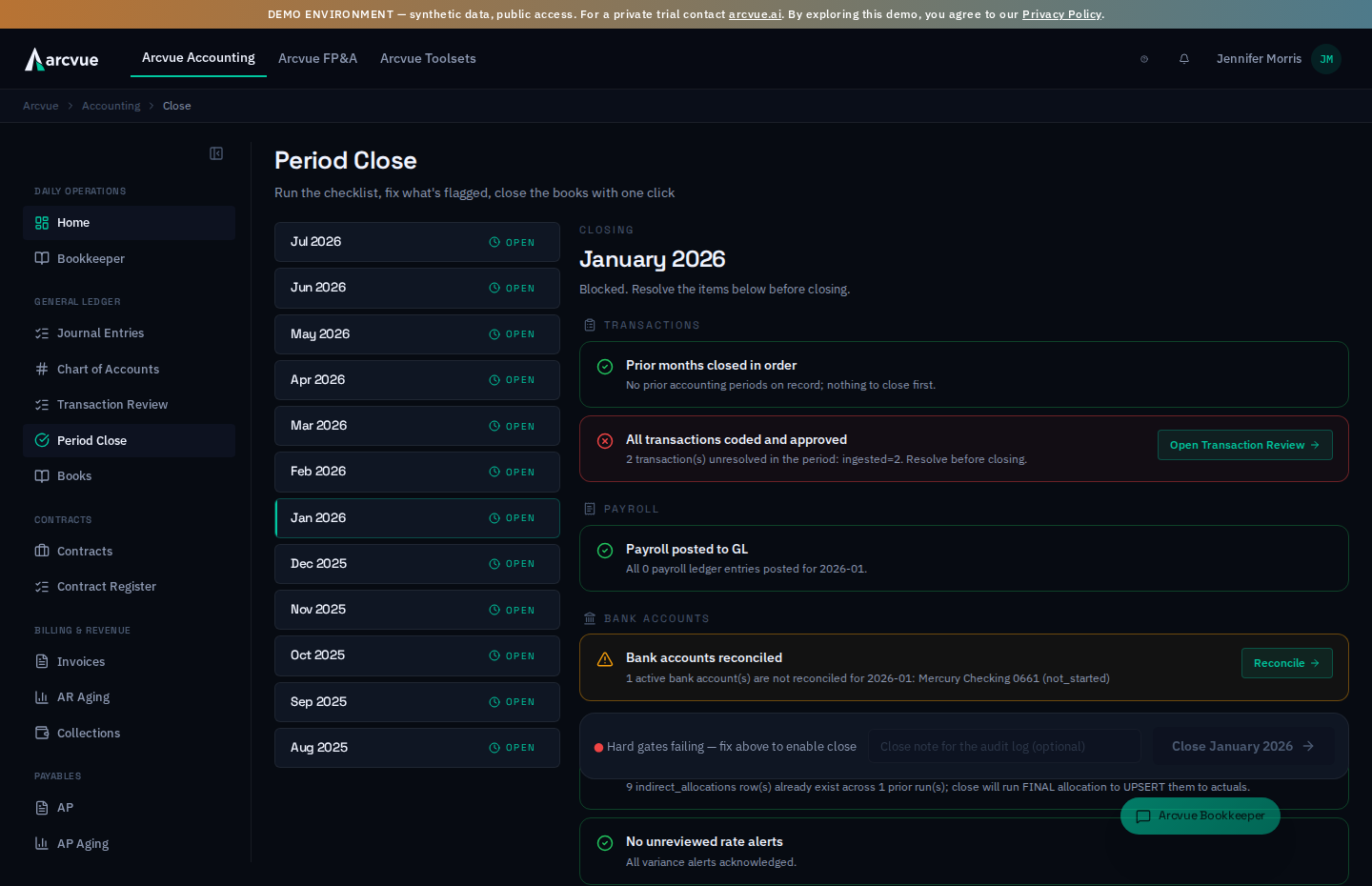
Closing a month means declaring "the books for this month are final." After that the numbers stop moving and become the official record you report, bill, and get audited against. This guide explains what a close is, then walks the exact clicks in Arcvue. It assumes you run a business but aren't necessarily a career government accountant.
For: controllers and bookkeepers · Time: ~10 minutes · You'll need: the Accounting module and permission to close periods.
Part 1 — The ideas you need first (read once)
What closing does. All month, transactions flow in and can be edited, re-coded, corrected. At close you draw a line: the month freezes, its totals become official (what you bill, report, and show an auditor), and the next month starts from a settled point. In Arcvue a month is open (still changing), closed (frozen, reopenable), or locked (permanently sealed).
Why Arcvue won't just let you close. A close is only meaningful if the month is complete, so Arcvue runs a checklist first. Each check is one of two kinds:
- a hard gate (red ✕) — blocks the close until you fix it;
- a flag (amber ⚠) — a warning; you can close over it, but the closed numbers won't reflect it, so treat closing over a red flag as a deliberate decision.
What happens at the instant of close. In one all-or-nothing step Arcvue marks the period closed with who/when and writes the change log. If any part fails, none of it happens — there is no half-closed month. For a month before your books began in Arcvue, the close also runs the final indirect-cost allocation on actual costs, which is what makes those closed months audit-grade. From the month your books began in Arcvue, the allocation run already posts each month's contract burden from the ledger, so the close does not run it a second time.
Part 2 — How to close a month
Step 1 — Open Period Close
In the left nav, go to Accounting → General Ledger → Period Close
(/accounting/close). The page header reads Period Close — "Run the checklist, fix what's flagged, close the books
with one click."
The left column is a 12-month timeline; each month is a pill showing its
status: open, closed, or locked. Arcvue pre-selects the oldest open
month, because months must close in calendar order. Click a different month
only if you mean to work it.
You can also start from the Accounting Home page: the close runway strip shows the open month, how deep into it you are, whether the close gate would pass today, and — if not — which named gates are blocking. Clicking the strip lands you on Period Close. That verdict comes from a real dry run of the same checklist below, so what Home shows is what this page will show. If a period sits open more than 20 days past month-end, an Overdue closes line also appears in the Home docket and links here.
Step 2 — Work the checklist
The right column groups the checks into Transactions, Payroll, Bank Accounts, and Compliance. Each failing row has a button that takes you straight to the fix:
| Check | If it's red, click | Where it takes you |
|---|---|---|
| All transactions coded and approved (hard gate) | Open Transaction Review | /accounting/review |
| Prior months closed in order (hard gate) | Close <Month> first | the oldest open month |
| Bank accounts reconciled | Reconcile | /accounting/reconciliation |
| Payroll posted to GL | Review payroll | /accounting/feeds (Payroll tab) |
| Wage expense in the ledger matches worked labor (flag) | Review | /accounting/feeds (Payroll tab) |
| No unreviewed rate alerts | Review | /admin |
| Indirect rates ready to allocate | Review | /admin |
| Depreciation, interest and amortization posted (flag) | Review | /accounting/assets |
| Subledgers agree with their control accounts (flag) | Review | /accounting/subledger-ties |
| Payroll register ties to wage expense (flag) | Review | /accounting/subledger-ties?period=YYYY-MM (the Labor dollars panel, month preselected) |
| Notes split correctly between current and long term (flag) | Review | /accounting/books?tab=balance-sheet |
| Cash flow statement reconciles (flag) | Review | /accounting/admin/chart-of-accounts (set the missing cash-flow category) |
| Imported documents all reached the books (flag) | (no control) | - |
| Imported documents all written to the books (flag) | (no control) | - |
| Previous system still sending us entries (flag) | (no control) | - |
Cash flow statement reconciles is worth a word, because the failure it catches does not look like one. The statement groups every balance-sheet movement into operating, investing or financing. An account with no group assigned is not put in the wrong section — it is left out altogether, so one side of an entry appears and the other simply does not. The statement still adds up. Nothing looks broken; the money is just missing. The row names the account, and the button takes you to the chart to give it a category.
One row has no button, and that is deliberate: Month has ended.
Every other failing check deep-links to the control that clears it. Nothing
clears this one but time — the month has to finish before you can close it —
so instead of a dead button the row states both dates: the month runs through
its end date and can close from the day after. A "Fix now" that cannot fix
anything would teach you the buttons do not mean anything, which is why this
row does without one.
Fix the hard gates (red ✕) first — they're what block the close. Warnings (amber ⚠) can wait until after the books are sealed.
"All transactions coded and approved" won't clear from the Bookkeeper queue — use Open Transaction Review. That gate counts canonical transactions still at pending review, which are resolved only on the Transaction Review page.
Three of the rows are worth knowing before they surprise you, because each one looks for a run that silently did not happen rather than for something you forgot to do:
-
Wage expense in the ledger matches worked labor compares the wages the ledger holds for the month against the labor your timecards say was worked. A month can pass Payroll posted to GL and still be missing a payroll — that row validates the payroll register feed, not the ledger the statements read — so this one compares the two directly. Its detail always names both dollar figures and the gap, pass or fail. A month with no timecard labor reads not applicable. For a month whose books are still the previous system's, a failing row whose worked labor is already on Arcvue's own ledger says it is waiting on the previous system's labor post, rather than that a payroll may be missing.
-
Depreciation, interest and amortization posted asks whether this month's period-end entries actually posted — fixed-asset depreciation, intangible amortization, debt interest, prepaid amortization and lease amortization. It only asks about the classes you actually hold, so a company with no leases is never asked about leases, and it counts entries rather than amounts: green means the run happened, not that every asset was covered. Review opens Assets & Depreciation, which shows per asset what has and has not been taken.
-
Payroll register ties to wage expense compares what the payroll provider paid — bridged to the month it was earned — against the ledger's wage accounts. The detail always carries both figures and the difference. Cannot be judged names why (a company's register feed stopping short of the month end or missing a run inside it, no run paid in the month); an unmapped pay code keeps it red until mapped. A difference inside the payroll materiality stated for the fiscal year passes and says so. For a month whose books are still the previous system's, a failing row also gives the difference against Arcvue's own ledger, so a month the previous system has not posted yet does not read as a lost payroll. A tenant with no payroll register reads not applicable. It is a flag.
-
Previous system still sending us entries checks whether the feed was still delivering when the month being closed ended. The two rows below it look at entries that ARRIVED; this one asks whether anything arrived at all, because a stopped feed makes both of those go quiet on a month nobody is writing to. No judgment about staleness is involved: the month ended on a date and the last entry arrived on a date, and if the second precedes the first the month cannot be complete. Both dates are named so the size of the gap is visible. Not applicable to a month Arcvue books itself, to one already replaced by the previous system's finals, or to a company that never had anything copied from a previous system.
-
Imported documents all written to the books checks whether anything the previous system sent us is still sitting in the queue. Entries arrive in two steps - copied across, then written into the books - and this row asks whether the second step finished for the month being closed. It is the quieter sibling of the row below: a refused entry leaves a reason behind, while one still queued carries none, because nothing has happened to it yet. That makes it indistinguishable from an entry that has not arrived, until whatever was going to write it stops running. No button: what clears it is the nightly copy running, which is not startable from the close screen. A large count with an old date means the copy has stopped and somebody should be told.
-
Imported documents all reached the books checks whether every entry the previous system posted in the month actually landed in the imported books. One kind is held back: an entry touching an account marked unallowable needs a written justification before posting, and the nightly copy is a machine with nobody to ask, so it refuses. That refusal is correct -- what was missing is that it was recorded where nobody would see it, so a month could close with the books short a document and nothing would say so. The row names how many documents, how much and why. There is no button: what clears it is a person supplying the justification, and those documents also arrive with the previous system's final numbers for the month.
-
Notes split correctly between current and long term checks that each loan or note you repay on a schedule is carried at the split its own schedule implies: the principal falling due within twelve months of month end as current, the rest as long term. The schedule already says which installments fall inside the year, so this has a right answer rather than being a judgment call. The detail names the note and both pairs of figures — what the books carry and what the schedule implies.
It exists because the entry that maintains the split posts the movement each month rather than the balance. That entry inherits whatever opening the books carry and cannot tell that the opening is wrong: every entry balances, every other check passes, and a wrong split is carried forward for as long as the note runs. This is the row that can see it.
The total owed is identical either way — this is only which of two accounts holds it — so it never blocks a close. Review opens the balance sheet, where both accounts sit together. A company with no scheduled note reads not applicable.
-
Subledgers agree with their control accounts runs the Subledger Ties for the last day of the month. Each subledger with a control account and an opening balance set is compared with its control account: the open bills with the payables account, the open invoices with the receivables account, and the others that guide lists. The row names any subledger that does not agree, and any tie that cannot be judged on that date, with the reason. A difference inside the threshold stated under Materiality for FY… on the Subledger Ties page does not fail the row; the detail names it as an immaterial residual. If no subledger has both set, the row reads not applicable and says so, rather than reporting a clean tie it never ran.
All three are flags. A controller routinely closes with a known, documented reconciling item; what these rows guarantee is that nobody closes without knowing.
Step 2b — Read what moved, and why the rates moved
Under the checklist, two panels explain the month before you close it. Neither blocks the close, and both are described in full in the Bookkeeper guide:
- Arcvue explains the month puts one card in front of you per material account movement, with a proposed explanation bound to the drivers on the card and cited by entry. Click Explain <month> to start. Your decision on each card is locked into the period as the flux workpaper, and Export workpaper downloads it.
- Why the rates moved shows each indirect pool's rate against the month before, split exactly into what the pool's own cost did and what the base did, with the entries behind each. A confirmed explanation becomes the starting point for that pool's forward-pricing justification.
Both compare the month you are closing with a finished month before it. If the month before is still open, they say so and wait.
Step 3 — (Optional) post month-end accruals
In the Month-end accruals panel, click Preview accruals, then Create draft entries to write them. Each accrual auto-reverses on the first day of the next month. Created entries are drafts — review and post them from Journal Entries.
Two accrual types are proposed: Accrued accounts payable and Subcontractor labor. Subcontractor labor accrues approved Subcontractor Portal hours the subcontractor has not invoiced yet, priced at the rate the person's staffing names: a rate on the subcontract agreement, or a purchase order line. It appears only for a month with such hours, says which of the two priced them, says how many of the month's hours it cannot cost yet (submitted and awaiting approval, or still in draft with the subcontractor; an hour is costed only once it is approved, so the month understates subcontractor expense until someone acts on them), and it names any hour it cannot price exactly rather than guessing (see Accruals for what it skips). The panel knows five types, and the other three always appear under a Not proposed heading with the reason they were held back:
| Not proposed | Why |
|---|---|
| Payroll accrual | The straddle calculation needs a pay calendar — pay-period boundaries and pay dates — which is not wired yet |
| Unbilled receivables | This is revenue recognition (ASC 606) and is deliberately held for explicit sign-off rather than drafted automatically. Use the Revenue recognition (ASC 606) panel below instead |
| Prepaid amortization | It is not an accrual. Each prepaid's monthly slice already posts on its own from the Prepaid Register at Accounting → Assets → Prepaid, and it is permanent, while everything this panel drafts reverses on the first day of the next month |
This is worth knowing before you close: seeing one or two drafts where you expected more is the system working as designed, not a month with nothing to accrue.
Every accrued-payable draft is also a claim that a bill is coming, and the close keeps that claim. Each vendor the accrual anticipated becomes an expectation (the preview says "Anticipates N bills"). A daily job watches the payables register and links the bill when it arrives, recording accrued versus actual and the variance. If the accrual has auto-reversed and no bill came within the window, the claim is flagged and the Accruals awaiting a bill panel, directly under the accruals panel, lists it first. Three decisions, each recorded with who made it:
- Link this bill — every bill from that vendor dated inside the window is listed under the claim with its variance; you confirm which one it is.
- Re-accrue — the bill is still coming: write a fresh accrual into a later month. Accrue into (the month), Expense account and Amount are yours to set; the amount defaults to what was accrued.
- Close — never coming — the cost will not be billed. The note Why the bill is not coming is required and stays with the claim.
The controls on those three decisions. Close this claim is the button
that commits never coming, and it stays disabled until you have typed the
note — so the reason is not optional in practice, it is the thing that
unlocks the button. On Re-accrue, the Expense account picker reads
Choose an account until you pick one; that account is what the
replacement accrual DEBITS — the accrued-payables account from Settings is the
credit side, and you do not choose it here. Write the replacement accrual is the button that commits a
Re-accrue, and it stays disabled until the form is complete — an expense
account chosen, an amount above zero, and a period that resolves. Cancel
backs out of any of these forms and records nothing.
On the accrual's own entry, the What this accrual anticipated card shows the same chain — expected, reversed, the bill that came and its variance — so an auditor reading the entry sees what became of it without leaving it.
Step 3b — Elect how award fee is estimated before it is scored
This panel appears only if your tenant holds a cost-plus-award-fee contract. If you do not see it, you do not have one — that is not a fault to chase.
A CPAF contract's fee pool is not earned until the contracting officer scores it, which happens after the period you are closing. The election here is what month-end recognition estimates in the meantime. Arcvue offers the options; you conclude, in your own words, and the recognition run enforces what you stored.
First, the basis — what to estimate:
| Option | What you are committing to |
|---|---|
| Constrain until scored | Estimate nothing. The fee is recognized in the month the contracting officer's score is billed. The most conservative reading, and the one that never has to be unwound. |
| Historical percent earned | The percent of pool this company has earned on completed award-fee contracts, derived from scored fees actually billed — evidence rather than expectation. |
| Initial take on the criteria | Your reading of the award-fee plan criteria, entered as Expected percent of pool, with the reason written down. |
Then the pattern — how the estimate spreads across the period:
- Straight-line across the period of performance — even across the period of performance. Permitted while the contract's pool is at or under the Straight-line threshold you state; above that the estimate follows cost instead.
- In proportion to cost incurred — the expected fee is earned as costs are incurred against the contract's estimated cost.
Straight-line threshold is a materiality election, not a switch. It
does not turn straight-line off. It says how large a pool may be before
straight-line stops being defensible, and the engine moves that contract to
cost-proportional on its own. Its placeholder reads no limit, so leaving it
empty is a decision too — it says straight-line applies at any size.
Write Why this policy in your own words; it is what an auditor reads next to
the number. The button that saves it says whether a policy is already on file:
it reads Record the policy when none is, and Record the new policy once
one exists. If you see the word new, a policy is already in force and you
are about to supersede it — like every other election in Arcvue, the earlier
one stays on the record rather than being overwritten. Once a policy is on
file, Change the policy reopens the form to supersede it. Cancel
abandons the edit.
Step 4 — Review revenue recognition
The Revenue recognition (ASC 606) panel shows the month per contract: Method (the election in force, or Default rule with Elect on the contract page beside it), Basis (the rule that earned the amount and the recognition run's own sentence), On the books beside Derived now, and a State — On the books, Will restate, Posts on the next run, Cannot be grounded (with the reason), or Nothing due. Contracts the run does not recognize by design sit under Nothing to recognize this month. Nothing here is a button to press: the recognition run posts on its own every day and re-derives an open month until it closes; a closed month stands as posted. If a row says Will restate, read its basis and confirm the upstream change is right before the run moves the figure. If it says Default rule, the amount is a default rule rather than a decision — elect the method on the contract page before you close. Try again reloads the panel after a failed read.
Reading the recognition panel
The panel is headed Revenue recognition (ASC 606) and carries two money figures, at the top and again on every row. They answer different questions and you will misread the screen if you treat them as one.
- On the books — what the recognition run actually posted for this period.
- Derived now — what the same run would post from today's inputs.
The panel also says which ledger is the book of record for the month. From the month your books began in Arcvue it reads "Arcvue's ledger is the book of record for …". For an earlier month it says the figures are Arcvue's own copy of a month your prior system is the book of record for — the parallel run rather than the books — and names the month Arcvue's books begin. If no such month has been set, it says the figures are Arcvue's own derivation rather than the books. The line labels the figures; it never changes them.
A gap between them in an open month is a forecast, not a discrepancy. The run re-derives an open month every day, so a row whose figures differ is telling you what the next run will do. The panel says so in a line of its own: N contracts will move on the next run. Nothing is wrong and nothing is waiting on you.
A closed month is never re-derived. Once the period is finalized, what posted stands, and the panel says that instead. So the same two columns mean "this will change" before the close and "this is what happened" after it.
There is no button here that posts anything. The panel is read-only — the recognition run posts on its own daily schedule. Your job at this step is to read it, and the single action it offers is a link: each row's Customer · contract opens that contract's own page.
The columns
| Column | What it tells you |
|---|---|
| Customer · contract | Who and which contract; the link opens the contract |
| Method | The rule this contract earns revenue under |
| Basis | The measurement that rule was applied to |
| On the books | Posted for this period |
| Derived now | What today's inputs produce |
| State | Whether it agrees, will move, or cannot be grounded |
A figure whose method is not on screen cannot be reviewed, which is why Method and Basis sit beside every number rather than in a report somewhere else.
The three lines worth acting on
"N contracts recognize on a default rule with no method elected." These are earning revenue under the fallback because nobody has recorded how the contract earns it. It is not an error and the books are not wrong — but the election is a judgment only a person can make, and the default is standing in for it. Open the contract and record the election.
"N contracts cannot be grounded; the reasons are in the table." Read the State cell on those rows: the reason is printed there, in words, not as a code.
"N contracts will move on the next run." Each of those rows says which thing moves — the amount, the measurement basis, or both — rather than only that something differs. Two equal amounts under a bare "something changed" would read as a contradiction, so the row names the moving part itself.
What is deliberately quiet
Nothing to recognize this month collapses the contracts the run is not expected to touch — a vehicle rather than a contract, a period outside the performance window, nothing due, and a contract the books do not keep. They are listed with their reason and folded away because they are not findings. Open the group if you want to confirm one; leave it closed otherwise.
If the panel cannot load, it says so for that month and offers Try again. It has not lost anything and nothing needs re-entering.
Step 5 — Close the month
When every hard gate is green the header shows "All checks green — ready to
close" and the sticky bar at the bottom reads ● All hard gates passed.
Optionally type a Close note for the audit log, then click
Close <Month YYYY> (teal only when the books are ready; gray and
disabled otherwise).
Part 3 — How to know it worked
A checkmark celebration appears — "<Month> closed" — and if allocation
ran, "Final allocation $… across N pools." The month's pill flips to
closed ✓, and the checklist is replaced by "<Month> is closed — the
books for this period are sealed."
The sealed screen keeps the close's record. Under the sealed banner it says what the checklist found at the moment of the close — "Every check passed when this period closed", or "N warnings were still open when this period closed" followed by those warnings with the figures they carried then — and who closed it. The timeline pill shows the same count. A period that closed before Arcvue kept this record says so rather than showing nothing. Every close from now on records its verdicts; a reopen leaves the record of the earlier close in place.
Turning a warning into a hard stop for your company. A warning never blocks a close by default. If your policy is that a particular check must pass before a month can close, that check can be made a hard stop for your company. It is a per-company setting naming the checks to promote, which today your Arcvue implementation contact sets for you; there is no screen for it yet. From then on that check refuses the close for your company the way the hard gates do, and the preview shows it as one.
Part 4 — When something looks wrong
The Close button is gray and won't click. A hard gate is still failing —
the bar reads ● Hard gates failing — fix above to enable close. Resolve
every red ✕ row and it turns teal.
"Prior months closed in order" is red. An earlier month is still open. Click Close <Month> first — Arcvue jumps you to the oldest open month.
A bank account shows it isn't reconciled. Closing over it means the books may not match the bank for that account. Reconcile it first unless you have a specific reason not to.
Payroll shows unposted entries. Those labor costs won't be in the closed numbers until posted — which throws off both your cost picture and any cost-reimbursable billing. Post payroll before closing.
I closed the wrong month. A closed month shows Reopen period… (admin
role required). Reopening records a reason in the audit log. The field is labeled Reason for reopening (recorded in the audit log) —
the label is the warning: what you type is kept, not just checked. It is
required, the reopen button stays disabled until it is filled in, and
Cancel closes the form without reopening anything. If the reopen is
refused, it is your role — reopening is admin-only.
Reopen sparingly: anything downstream that used the closed numbers (invoices, reports) may need to be regenerated. A locked period cannot be reopened — that's the permanent seal.
One-line summary
Open Accounting → Close → clear the hard gates (transactions, prior months) → decide on any flags (bank rec, payroll) → Close <Month>. Closing freezes the month, and for a month before your books began in Arcvue it also runs the final actual-cost allocation. Fix mistakes by reopening, never by editing a closed month.
Related
- Work the coding queue → Transaction Review (
/accounting/review) - Reconcile a bank account → Bank reconciliation
- Tie the subledgers to their control accounts → Subledger Ties
- See what depreciated and what never did → Assets & Depreciation
- What a GovCon close covers → Concepts: month-end close