Ownership Register — Controller Guide
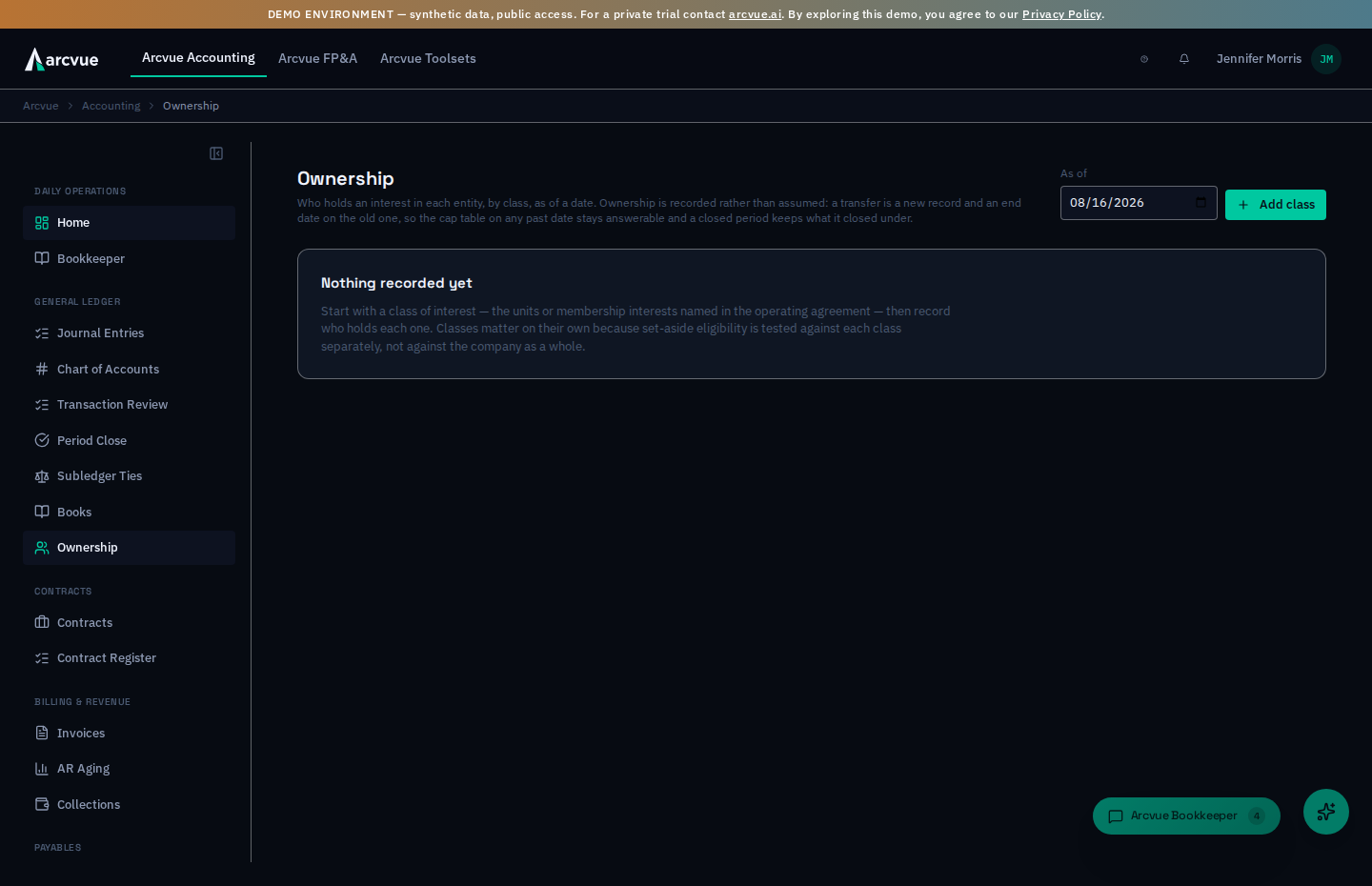
The ownership register records who holds an interest in each legal entity, by class, effective from a date. It is a record, not a model: the lender export can already project a cap table from deal assumptions, and this is the fact that projection should rest on. This guide explains why classes and "unconditional" ownership are recorded separately, which instruments carry a FAR consequence, and then walks the exact clicks to record a class, a holder, and a transfer.
For: controllers and owners · Time: ~10 minutes · You'll need: the Accounting module, the operating agreement or stock ledger, the effective date of each holding, and — to change the register — read-write on the Acct: Ownership row of your company's permission matrix. That row is deliberately narrower than the general ledger's: who owns the company follows a legal document, not a bookkeeping judgment.
In the left nav, open Accounting → General Ledger → Ownership (/accounting/ownership). The page header reads Ownership.
Part 1 — The ideas you need first (read once)
Why classes are recorded on their own
Set-aside eligibility is tested per class, not on the company as a whole. For an LLC the qualifying owners must unconditionally hold at least 51% of each class of membership interest; for a corporation, 51% of all stock and 51% of each class of voting stock. A single company-wide percentage cannot answer that, so a class is a record here rather than a label on a holder, and each class says whether it carries voting rights.
Unconditional is a separate number, and it is the one that counts
An interest under a voting trust, an executory agreement, or with its voting rights assigned elsewhere is real ownership that does not count toward the 51%. Every class shows two figures side by side — allocated (every interest recorded, encumbered or not) and unconditional — and highlights the gap. If a class reads 100% allocated and 55% unconditional, the eligibility answer is 55%.
Instruments that carry a FAR consequence
Compensation valued on changes in security prices is unallowable under FAR 31.205-6(i) — the regulation names stock options, stock appreciation rights and phantom stock. Classes of those three instruments are flagged on this page, because the cost has to stay out of the indirect pools and an auditor will test it.
| Instrument | Flagged? |
|---|---|
| Membership interest, common stock, preferred stock, profits interest | No |
| Restricted stock, restricted unit award, RSU | No — these deliver the security itself rather than paying an amount measured by its price movement |
| Phantom stock, SAR, option | Yes — unallowable under FAR 31.205-6(i) |
Profits interests need a threshold
A profits interest gives a share of future value only, above a threshold fixed at grant. Without that number the grant cannot be valued, so the register refuses to record one without it rather than defaulting to zero — a zero threshold is a real and far more valuable grant. A class whose profits-interest holdings carry no threshold shows a warning naming how many.
What Arcvue deliberately will not do
- It won't edit or delete a holding. A transfer is a new record and an end date on the old one, so "who owned this on 30 June" stays answerable and a closed period's cap table cannot change under you.
- It won't count an encumbered interest toward the unconditional figure.
- It won't record a profits interest with no threshold.
- It won't keep the cap table of an entity whose books you do not keep. A venture with outside ownership has its own register, and it is not yours to maintain.
Part 2 — How to run it
Step 1 — Declare a class of interest
Save class is the commit on this step.
Press Add class. Give it the Legal entity that issued it (the holding company, a subsidiary), the Class name as the operating agreement calls it, the Instrument (membership interest, common or preferred stock, profits interest, restricted stock, restricted unit award, RSU, phantom stock, SAR, or option), and whether it carries voting rights. Save. A toast confirms Added <class>.
The Legal entity field suggests the entities already in the register, and you can type an entity's name or its code. When Arcvue can resolve a name to one of your company's entity codes it stores the code, so the class reads alongside the books kept under that code — and the same entity typed two ways cannot become two classes.
Delete class appears on a class that has no recorded interests — the case of a
class declared by mistake. It removes the class from the register after you confirm in the
Delete this class of interest dialog (Cancel keeps the class). A class that has ever had a holding is a record and
cannot be deleted; end its holdings instead.
Step 2 — Record who holds it
Save holding is the commit on this step.
On the class, press Add holder. Enter the Holder and their Holder type (individual, entity, trust or estate), then either Units held or the Percent held — leave the other blank, depending on how the class is expressed. For a profits interest, fill Threshold ($). Set Effective from — the date the holding took effect under the governing document.
Leave Unconditional ticked unless a voting trust or agreement restricts the interest; if it does, clear it and say what restricts it in Encumbrance. That sentence is what an eligibility reviewer asks for.
A wholly owned subsidiary is a holding whose holder is another entity: record the class on the subsidiary and the parent as the holder.
Step 3 — Read a class
Each class shows its allocated total, its unconditional total, and the holdings table beneath: Holder, Units, Share of class (this holder's share of this class, not of the whole company), Threshold, Unconditional (Yes/No), In force (the effective date, and the end date if it has one), and Actions.
Step 4 — Record a transfer
A transfer is two actions: end the old holding on a date, then record the new one from that date. In the old holding's row use the action to end this holding on a date — the record is kept, marked Holding ended, not deleted. Then Add holder for the new owner, effective the same date. The end date is exclusive, so a holding that ends and one that begins on the same day do not both count that day.
Step 5 — Look back
The As of control shows the register as it stood on any date, not as it stands today. Use it to answer an eligibility or diligence question for a past date without reconstructing anything.
Part 3 — When something looks wrong
"A class reads 100% allocated but less than 100% unconditional." One or more holdings are encumbered. That is the register doing its job — the lower number is the one an eligibility test uses. Open the class and read the Encumbrance on each holding marked No under Unconditional.
"It refused to add a profits-interest holder." No Threshold ($) was given. It is required, because a zero threshold is a different (and much larger) grant, not a blank.
"A class is flagged as unallowable under FAR 31.205-6(i)." Its instrument is phantom stock, a SAR, or an option. Nothing is wrong with the record; the flag is telling you the compensation cost from that instrument must stay out of the indirect pools.
"I recorded a holder with the wrong percentage." End the holding on its own effective date and record it again correctly. Nothing is edited in place, and the corrected history is exactly what an auditor wants to see.
"The page says Nothing recorded yet." Start with a class of interest — the units or membership interests named in the operating agreement — then record who holds each one.
What the operating agreement does to the books
The register above says who holds what. The panel below it is what that does to the general ledger: two events move member capital, and both divide by the percentages the register carries.
Recorded ownership is stated once, at the top, before anything that depends on it. Percentages that do not total 100% are the single most likely reason an allocation is wrong and they are invisible one row at a time — so the figure is shown whether it is right or not, and nothing posts until it reads 100%.
Naming the account for each member
The table lists every live holder with four accounts to designate:
| Column | What it is |
|---|---|
| Holder | The member as the operating agreement names them |
| Share | The share of the company they hold — em dash when no percentage has been recorded |
| Capital contributed | The account this member's contributions of capital are credited to |
| Distributions | The account a distribution to this member is charged to when it is declared |
| Declared and unpaid | The liability the company carries between declaring a distribution and paying it |
| Share of earnings | The account this member's share of the period's earnings is closed into |
The picker saves the moment you choose. There is no save button on this table. An undesignated cell reads Not designated, and selecting an account records the designation immediately and confirms it. So treat a wrong selection as a designation you have just made — it supersedes rather than edits, which is the behavior described below, and it is why the cell states its own state rather than inviting you to pick.
Nothing is inferred from the chart. A member with no designated account is named in a refusal rather than defaulted into an account that looked plausible, because an entry posted to the wrong member's capital is not visible in any total — the books still balance.
A designation is never edited. Choosing a different account records a new one that supersedes it, so entries already posted under the old designation stay explicable.
Declaring a distribution
Declared on is the date the members resolved. Kind separates a regular distribution from a tax distribution — the one that covers the members' tax on company income. Amount is the total, which is split across the members by their percentages. Authority is required: the resolution, consent or minute that authorized it, in your words. It is the first thing an auditor asks about, and a blank there would make Arcvue the reason nobody can answer.
Declare raises the payable. Member equity is charged and a liability is recorded, because the company owes the money from the moment it is declared.
The payment is not entered here and usually needs nothing from you. It arrives in the bank feed, and when an outflow is plainly one member's share of a declared distribution — that member, that amount, on or after the declaration — Arcvue books it against the payable the declaration raised, clearing the liability rather than charging member equity a second time. When two outflows could pay the same line, it asks you rather than guessing — which liability, never which account. Entering the payment twice is the one mistake this screen is shaped to prevent.
The panel you fill in is headed Declare a distribution — the imperative, not the gerund this section is titled with — and Declared distributions below it lists what has already been declared. The second one is absent entirely until there is one, so an empty space there means nothing has been declared, not that the list failed to load.
And the other empty option on this panel is not the same kind of thing. Allocating the year's earnings asks for an Earnings account, whose unset value reads Choose an account. That one is a prompt and commits nothing — it sets up the allocation you are about to run. Not designated reports a state and saves on selection; Choose an account asks for an input and does not. Same shape, opposite behavior, and the wording is the only thing on screen that distinguishes them.
Allocating the year's earnings
Fiscal year and Earnings account name the balance to close out. The preview shows each member, the percentage that produced their amount, and the one member who carries the remainder — cents do not divide evenly, and giving the remainder to the largest holder is the only split that does not depend on the order the members happen to be listed in.
Allocate and draft the entry posts nothing on its own: it drafts a journal entry for review, the same as every other engine-proposed entry. A loss allocates the same way in the other direction — member capital is reduced.
If the preview shows a sentence instead of a table, that sentence is the whole problem. It names the member with no percentage, the member with no designated account, or the total the percentages actually came to.
One-line summary
On Accounting → General Ledger → Ownership, declare each class of interest per legal entity, record each holder with an effective date and whether the interest is unconditional, and record transfers as an end date plus a new holding — never an edit. Eligibility reads the unconditional figure per class; phantom stock, SARs and options are flagged as unallowable under FAR 31.205-6(i).
Related
- The statements whose equity this register underlies → Financial Statements
- The FAR cost-principle behind the flag → Compliance reference: FAR 31.205 selected costs
- The audit binder this feeds → Audit Support & ICS Submission