Flightdeck — Controller Guide
*Flightdeck is the one screen that tells you whether your books are being fed,
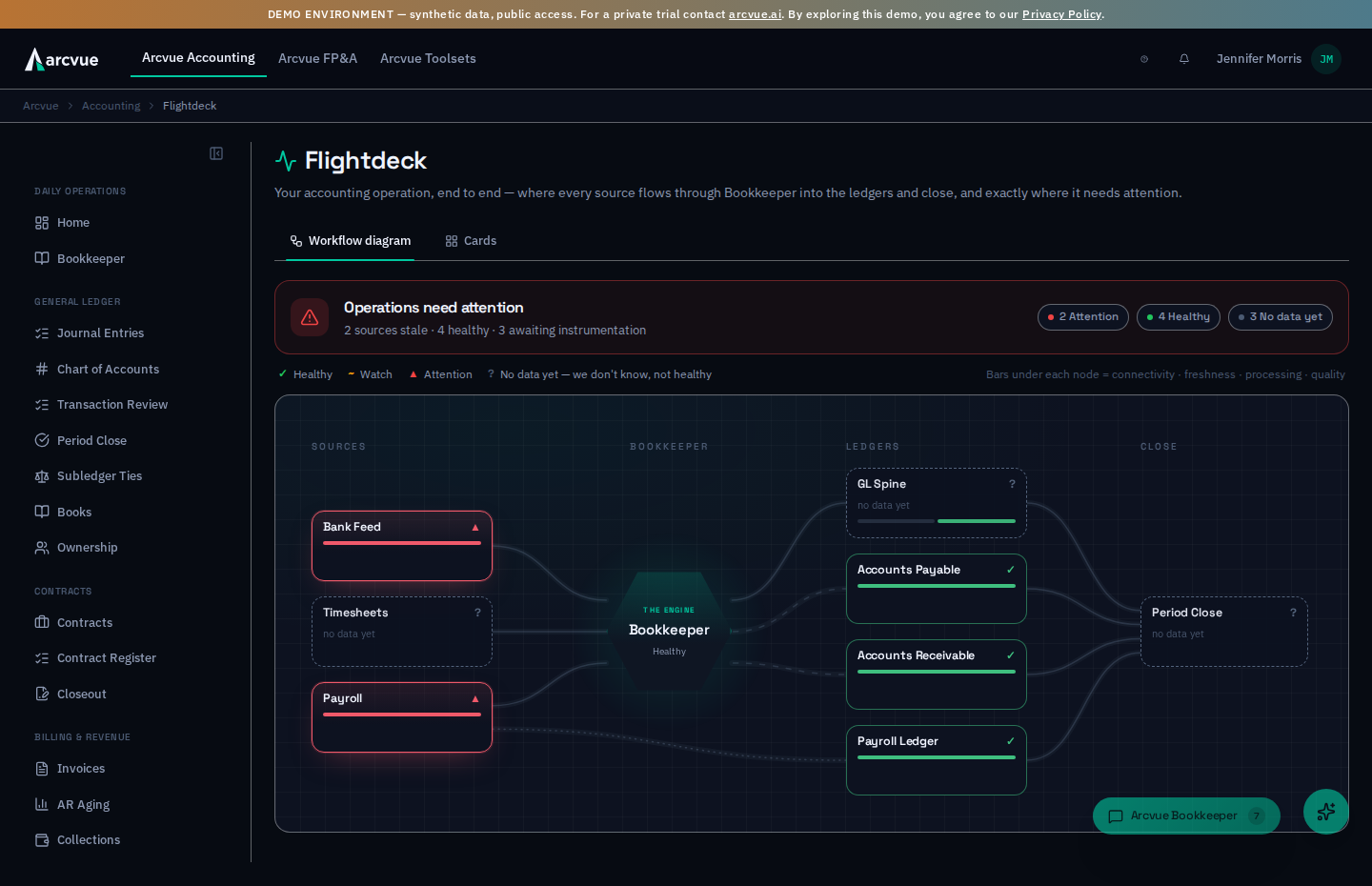 coded, and balanced correctly right now. It is a live map of your accounting
instance: every place data comes in on the left (your bank, your credit cards,
your vendor bills, your payroll, your timesheets), the Bookkeeper in the middle,
and your ledger, subledgers, and close on the right. Each box carries a health
color. Green means that piece is doing its job. Anything else tells you what's
wrong and what to do about it — before it becomes a month-end surprise.*
coded, and balanced correctly right now. It is a live map of your accounting
instance: every place data comes in on the left (your bank, your credit cards,
your vendor bills, your payroll, your timesheets), the Bookkeeper in the middle,
and your ledger, subledgers, and close on the right. Each box carries a health
color. Green means that piece is doing its job. Anything else tells you what's
wrong and what to do about it — before it becomes a month-end surprise.*
Accounting → Cash → Flightdeck (/accounting/flightdeck). The Accounting
Home page also points here — its footer link ("Pipeline health lives on the
Flightdeck") opens Flightdeck, and the docket's "No signal" line tells you to
check Flightdeck whenever a source has too little signal to judge.
Why it exists
The old failure mode in any accounting system is the silent one: a bank feed quietly stops delivering, a vendor-bill inbox backs up, a connection expires — and nobody notices until the close doesn't tie and you're reconstructing weeks of history. Flightdeck's job is to make silence loud. It watches every feed and every processing step on your behalf, and it surfaces a problem the morning it happens, pointed at the exact box, with the fix attached.
The two views
Flightdeck opens on the Workflow diagram tab — the live board that lays your pipeline out left to right (connections → sources → Bookkeeper → ledgers → close). The tab row at the top switches you between it and the Cards tab, a compact list of the same boxes. Click Cards for a scan-in-one-column view, or Workflow diagram to see the flow. Both are driven by the same health checks described below.
How to read a box
Every box reports up to four independent layers of health, and the box takes the color of its worst layer. On the Workflow diagram each box carries four small bars underneath it — one per layer, in this order:
| Bar / Layer | Question it answers |
|---|---|
| Connectivity | Is the connection to this source alive? (token valid, webhook receiving) |
| Freshness | Has new data arrived recently enough for this source's normal rhythm? |
| Processing | Did what arrived actually get coded / posted, or is it piling up? |
| Quality | Do the results hold together? (the ledger balances) |
Colors:
- Green (Healthy) — verified healthy from real, recent activity.
- Amber (Watch) — attention soon: slightly overdue, a connection needs a re-link, or a few items have gone uncoded longer than usual.
- Red (Attention) — acting now: something is broken or stuck; the box carries the fix.
- Gray (No data yet / No signal) — not enough signal to judge yet. Flightdeck never paints a box green just because nothing has happened — no news is unknown, not good.
Silence is only red when data is due
Timesheets that have been quiet for three days are red — time is entered daily. Payroll that has been quiet for ten days is green — it arrives every two weeks or twice a month, so ten days is its normal rhythm; it turns amber past about 16 days and red past about 23. Flightdeck knows each source's expected cadence, so it only raises a freshness flag when data is genuinely overdue. (If a source's rhythm is unusual for your business, the cadence is adjustable — ask your implementation contact.)
Your bank feed is judged in business days. Banks do not post at the weekend or on a federal holiday, so those days do not count against it: a quiet long weekend adds nothing to its clock, while a weekday with nothing arriving counts exactly as it always did. The bank feed shows amber after more than one quiet business day and red after more than three.
Which feeds the board actually watches
A health board is only as honest as its list of things to watch, so it is worth knowing what is on that list and what is deliberately not.
Your bank connections are watched continuously, and a connection that has stopped talking to us goes red — not green. This is the difference between "nothing has arrived" and "nothing has arrived and nothing is going to". A quiet connection used to be indistinguishable from a healthy one during a slow week; it no longer is.
Timecards are judged on when they arrived, not on when something downstream touched them. If your team has entered time and it reached us, the timecard box is green even if a later step has not run yet — and if that later step is the thing that is stuck, it shows up as a processing problem on its own box rather than making time entry look broken. One limit to know: the clock today reads the timesheets brought in from your previous time system. Time entered directly in Arcvue does not move it yet, so if your team enters its time in Arcvue and this box is not green, check the timesheets themselves before concluding time entry has stopped.
Card activity is watched through your bank connections, not as a separate feed. A credit card linked the way a bank account is linked arrives with your bank transactions, so the Bank Feed box already watches it. Card history imported once from a card provider is different: those transactions are real and you can work with them, but nothing is scheduled to deliver more, so the board does not sit waiting for them. Showing that history as "overdue" every day would have been a permanent red you could never clear, which is the fastest way to teach yourself to ignore a health board.
If a box is showing something you believe is wrong, that is worth telling us — a health board that cries wolf is worse than no health board, and every one of the cases above was found and fixed exactly that way.
What the reds mean, and what to do
Every red resolves to a plain-language diagnosis and a next action — no dead-end error codes. The common ones:
- A source feed has gone quiet past its cadence → confirm the upstream connection is live and sending; if it's a periodic statement that simply isn't due yet, the cadence can be adjusted.
- A connection was revoked or needs re-linking → an admin presses
Reconnect on that connection in Bank Feeds setup (
/admin/bank-feeds; see Bank Feeds, Step 3b) and signs in to the bank again; no new transactions arrive until that is done. If the account is dormant at the bank, Switch off is the answer instead, because signing in again cannot succeed. - A source provider's delivery failed (including an item that landed in a period you've already closed) → review the connection and the item; re-open the period or re-authenticate as prompted.
- A poller hasn't run in its window → the scheduled pull for that source may have stalled; your implementation contact re-runs it and confirms the schedule.
- Ingested items are stuck uncoded (e.g., emailed bills extracted but never coded) → review the stuck items and disposition each (forward the real bill, or mark it as not a bill).
- More arrived than got coded → the Bookkeeper is behind on that source. Rows that arrived in the last couple of days don't count against health — they drain on the next daily coding pass. A handful of older rows still uncoded shows amber (worth a look soon); the box turns red only when a meaningful backlog has sat uncoded past its coding window — a genuine stall: review the uncoded rows in Bank Feeds and escalate any it can't place.
- Coded rows never reached the ledger → the Bookkeeper coded them, but the ledger declined to post them. This one is worth understanding, because it is invisible to every other check on this page: a declined row writes neither side of the entry, so the ledger still balances. Balance can only speak for the entries that are there. Flightdeck counts the ones that are not — how many coded rows, how many dollars, and a breakdown by reason — on the ledger's Processing bar. A shortfall like this is usually waiting on a posting rule rather than an answer from you (an internal transfer coded to a cash account is coded correctly; what is missing is its matching side), so it deliberately does not queue up as a pile of questions. Watch the number fall as each class of reason is fixed. A company that never ran Arcvue side by side with a previous system shows unknown here rather than green — the check is not measured for it, and an unmeasured book is not a clean one.
- The ledger doesn't balance → a structural posting problem; this opens as a high-priority item and should be cleared before you rely on the numbers.
Click any box to open its detail drawer — the connectivity, freshness, processing, and quality readings behind its color, and, for a red box, the recommended action (drawn from the product runbook; the action block only appears when there's an actual failure to fix). The drawer also carries a 90-day history strip that shows, day by day, how that box has behaved over time.
Onboarding and cutover
Flightdeck shows the same boxes before and after cutover. It has no box comparing Arcvue's books against the system you are coming from — that comparison no longer runs on a schedule, and a box that can only show a color nobody can clear does more harm than good on a board like this one. So cutover does not show up on the board; what you use the board for is the same on either side of it: every feed arriving, being coded, and reaching a ledger that balances. For the order cutover happens in, see Cutover.
How current it is
Flightdeck re-checks every source and processing step automatically, about every 15 minutes, and appends each observation to a permanent, append-only 90-day log — so the board reflects the last few minutes, and that log stands as your audit evidence these controls were working. Click any box for its 90-day history strip over that log: the day-by-day record that these controls have been working — your control-effectiveness evidence for an auditor.
One-line summary
Flightdeck is the live health board for your whole accounting pipeline: open Accounting → Cash → Flightdeck, read each box by the color of its worst of four layers (connectivity / freshness / processing / quality), and click any non-green box to get the plain-language fix and its 90-day history. Silence is shown as unknown, never a false green, and a red is only ever raised when data is genuinely due.
Related
- Work the uncoded rows a red points to → Bank Feeds
- The morning briefing that links here → Home
- What closing the month checks → Close a Month (Period Close)